2010-07-11

T5- Tagging and Social Bookmarking

I've seen and used online bookmarking before, but it was a few year ago. The social side and tagging feature are new additions since then. I can certainly see how useful this would be for education. The first video talks about using this with peers to share links, but sharing helpful links and tutorials with students could be very beneficial as well.

Websites found with Delicious and Diigo:
- History of Visual Communication | explOratorium -
- SmArtHistory | Heilbrunn Timeline of Art History | Art Babble -
- Graphic Exchange | Form Fifty Five | Visual Complexity -
- Abduzeedo | Smashing Magazine | Strange Maps -
- Art History Resources on the Web -

My Delicious Bookmarks
Photoshop being a big part of the art world and multimedia, I looked for content primarily in that area. I used tags such as tutorials, videos, contests, and other significant segments of the websites that may help differentiate them from each other.

2010-07-08

T4- Google Docs and Google Reader


Google has alot of powerful tools, which makes it not-so-surprising that it has become the #1 place on the web. Among these different tools includes Google Docs and Google Reader. I have known about these for a while now... but have done very little interacting with them. I know some of the staff on our campus has already put Google Docs into use in their classrooms. These have always looked like potentially useful tools, just things I hadn't ever fully investigated.

The ability to collaborate and share these documents between users is something I've always found interesting and what sparked my, previously unacted on, interest. With no current experience of it my own, I can neither confirm nor deny any allegations regarding it. Google discusses how you can edit and share the documents with other users at the same time. However, I have heard sometimes there are a few issues when editing these documents with others in real time. While the occasional difficulty may be an irritant, it should not be a deterrent, as figuring out what issues any piece of software may have can make it easier to successfully work around them.

As you are working online, there is one other concern whenever working with an online application. If you have a less than stable connection or are currently having connection/network issues; any changes or updates to the document could be lost. For this reason it would be important to keep a backup or some other sort of local copy of the document on your machine as well.

The different applets all seemed pretty standard and familiar. The ones think seem a little more interesting to me (not saying they are more or less useful, just more interesting to me) are the drawing, form, and from template.


Drawing> Drawing tool to create a diagram of 3-Point Perspective
Form> Mock Art Quiz
From template> Scrap Book> Australian Scrapbook
From Template> Flow Chart> Australia, Texas, or Elsewhere?

Haven't quite finished the scrapbook, but you get the idea.

If you're really into RSS feeds, google reader could be a great asset and time saver. However, I'm really not. I can't see myself using this one much personally, but it could certainly have its use in the classroom. It provides an easy way to keep on top of news or posts from different outlets of your choosing. While I don't see myself using this much personally, it was very easy to find RSS feeds for my content area. This is really probably the strength in Google Reader, allowing students to find related current information and articles based on topics of their searches.


RSS Feeds Found Through Google Reader
About.com's Graphic Design
Guardian's Art and Design
Planet Photoshop
You The Designer

2010-06-07

T3- Image Mashups and Generators

These are something I am less familiar with, and actually find pretty neat. Of course, in the long run, they are just fluff to content. However, they are a great way to get attention and a quick and easy way to create visual aids. So... they could be very important fluff :)

These can be used to be eye-catching elements in projects. Playing with ImageChef, and trying to get it to arrange text in a useful pattern, it also makes a strong point as to the benefit of the human intelligence over an artificial one. Using to long of a quote or poem creates gibberish. Trying to use a quote from Thoreau proved to be rather unsuccessful, due to how it tries to position letters based on fitting it within the desired shape over have the content actually be meaningful.

Would be an interesting way to introduce a typography project for art or multi-media... which is a project I had already considered...


Lyrics from Bernard Fanning's Wish You Well
Song we listened to each morning in Aussieland


Comic Strip Generator has some issues. The first concern I had was the chat room on the bottom. Some of the live chat isn't appropriate, and despite the fun theme of the page, this isn't really a site I think we could use with the kids. We'd have to find another site with out the chatroom. Furthermore, trying to actually create a comic, some of the comics are blocked altogether, where as some of them just load up as little red x's.

flickriver a wonderful search engine for images. Unlike google images or yahoo images the images it brings up are all of great quality. Press J on your keyboard after doing a search to enter a 'slideshow' mode. Contine to press J to move on to the next photo, press k to go back to the previous. Some amazing shots when searching Australia.

KMcElman_100416_0096 u IMG_0256
T IMG_5607_3 letter A
L KMcElman_100502_3813_I IMG_5694
via Spell with Flickr; too cool. The images are affected by the style scripts of the blog though... if your blog's style is to put frames around all your pictures, thats exactly what will happen. You can see the borders around the letters above, which is built into the template for my blog- while the effect normally looks nice on the other images, it detracts a bit from the effect of spell with flickr in my opinion :(
letter A letter U letter S


Wordle: techplanWordle: Alice2
Wordle creates some pretty nifty images as well. With a bit of play, its easy to make some pretty neat images. Although it can be a bit time consuming figuring out how to get them them to turn out the way you'd like.

Word It Out does basically the same thing, with just a few little differences here and there. WordSift appears to let you construct your own once you paste in some text, hit sift, and then open a workspace.

Majority of these sorts of applications, despite being highly amusing, have too much variability and spontaneity. Majority of these seem mainly useful in creating visual aids to keep a viewers attention, but seem to have little practical application for actually furthering knowledge in most areas. It would be difficult to show how the majority actually further a student's understanding of a project they used these tools for. While I enjoyed playing with Wordle above, did I really learn anything more about Alice in Wonderland by tinkering with Wordle? This is not to say they are without purpose. It all depends on how its implemented. An educator needs to access the tool, just like any thing else used during class time to ensure it and its use is beneficial. This is also, of course, not a comprehensive list of these sorts of things, but rather just opens the door as to what is out there that can increase interest our lead to potential growth in different content.

Glogster, on the other hand, seems to have a myriad of obvious uses. It can effectively be a use of technology to replace the poster board projects. Using glogster could be seen as a greener alternative to poster-board projects. It could also be a useful way to create 'rough-drafts' of poster projects, a sort of 'digital mock-up', before a student would beginning a physical poster. This could help students ensure success and ensure instructors would receive hopefully more polished and professional work than without it. Many of the glog's on the website are not impressive, and it would be important for the instructor to gather a few examples of what they are looking for before releasing the students on a Glogster project, regardless of the purpose of the project or activity. Although there are flaws with them here or there, I did feel these were some of the stronger ones I saw.

-Allen Ginsberg
-Global Studies: Genocide
-Book of a Thousand Days
-Learning about UDL

T2- Commenting

Comments- What really ought to be a subscript to the previous tool... I suppose that's why the first 'tool' was both blogs and avatars... well that and including comments along with the first step would probably be a bit too much.

There are many benefits to building an online education community. However, as students and teachers come to grips with it, there could be lots of unintended consequences. Students need to keep in mind the professional barrier between themselves and their educators, and also need to keep in mind that just because they are online doesn't mean they can use the casual and often inappropriate language and phrases often found on myspace, youtube, facebook, and a myriad of other social websites. This should be covered in digital citizenship/etiquette. Even though that is the last 'tool' on our checklist, I would hope that wouldn't make it the last topic discussed in a classroom making use of current technology.

Commenting advice? The commenting advice was more about how to receive comments than to make comments. While these were accurate, I didn't see much about how to comment on others in the class. While as educators, I assume we all already know how to conduct ourselves in a professional and polite manner, if we are using some of this content with kids, sources discussing netiquette are beneficial.

It is not uncommon for communication to get out of hand online. Even what may begin as polite discourse and disagreement online, often eventually spirals into bickering and immature name-calling, insults, and rude behavior (termed: flames or flaming). This behavior is sometimes paired with images to poke fun at and amuse others at their target's expense. Due to the anonymity and detachment technology allows, these situations escalate much more so than one would expect in reality. This behavior can be witnessed on blogs, forums, chat rooms, online gaming, and other online communities as well. This is something to watch for and to take preventive measures against in the classroom.

It is no doubt that many students have witnessed and probably participated in this via their online experiences by the time they reach high-school. I have read articles also stating that this behavior is also present through text messaging, even in some middle schools. Plenty of articles on cyber-bullying can be found online.

Comments:
Blithe Blog
Amy's House
Weg's Online
Ms. Sigala's Blog
Frogs, Chihuahuas, & Good Times

T1- Blogger and Avatars


Blogging is a simple way to begin one's sphere of influence on the web. Its popularity is a testament to that. Blogger, with its affiliation to Google, is one of the more popular ones- but there are tons of different blogging sites out there. Blogger does have some nice customization that other blogs don't have, but also seems to lack other features. Like in all areas, different services have different provisions, and finding what best suits you is always part of the equation.

In addition to this blog, I've also created the Wyatt Chapel Cemetery. A blog for the ongoing project had been requested from part of the Prairie View A&M faculty. Being one of the few experienced in this area, I volunteered to set it up.

The only difficult part, per-say, was that blogger decided to have an error today... and wouldn't allow me to setup the blog for several hours. Exciting.

With multi-media, students can use a blog to catalog their learning and efforts and what they are doing with their class time. Student's love playing with multi-media already, but sometimes they get a little lost playing a bit too much, or have a difficult time showing what they've really been doing. So, tell me about your difficulties and your successes, and upload you work-in-progress. View other's blogs and consume, critique (nicely), and produce... much the same way we are on here.

As far as creating a blog, they can be a very useful learning tool, and an interactive way to reflect and display a student's thoughts and progress in a class. However, when searching for blogs, things can be a little more concerning. There are alot of blogs out there. A LOT. With blogs normally being so easily creatable, widespread, and free, the issue of quality over quantity can easily be an issue. Quality aside, there are also plenty of blogs in areas unrelated to content areas, daily dairies of people often consisting of rantings or frustrations, and plenty on inappropriate topics.
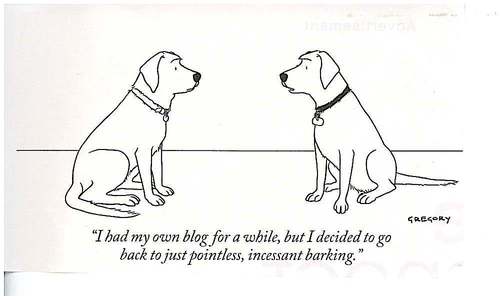
Using blogs in the classroom can be a great success, but it would likely be best to present the students with good examples to explore, rather than letting them find a multitude of various ones on their own.


Avatars:
Voki is a sight allowing users to create a 3d flash-based avatar for free. Personally, I wasn't too impressed with Voki's visual customizations. Sure it's 'flash'y, but that doesn't mean visually its worthwhile. There weren't very many choices for actual customization, only small edits on the defaults available. However, the feature of a talking avatar is rather unique. This is really what set's Vokis apart from other avatars.

The origin of the term avatar is a religious term. The term means a manifestation or incarnation of a deity. Digitally, the term is somewhat parallel. It is the user's representation of themselves normally used in online communities. It seems there are now two types of avatars. These newer ones consisting of flash applets like Voki and other similar services and the old school more static avatars. Most avatars are not a flash-based applet, but rather just a small image used to represent someone digitally (commonly used on forums as well as other places). Why the giraffe above? I like giraffes, and I thought it might get your attention.

Avatars, even on the net, are not a new concept. They have been in use since the 90s. However, they have recently become much more popular in the past few years. I assume part of this is due to the video game market. All three current video game systems allow users to create their own avatars. To the above right is an example created on the Xbox 360 built-in software. Below is an example of Spock, created on the Wii's built in Mii software.


- Voki: Low customization, but useful when desiring a 3d flash avatar that can speak.
- Meez: Flash based 3d avatar with lots of customization, but minus the ability to speak. Some customizations require using 'points' and a few actually require purchase. When choosing to export it, final product is converted into a gif image file.
- Yahoo! Avatars: Flash based 2d avatar with tons of customization. Currently unable to use the avatar for anything other than Yahoo services or Facebook.

Tools one&two are pretty simple for people already well-versed in this. Although, I get the idea that these two things might only count as one tool... so... a baker's 11 then?